Delays and Cancellations
NOTICE: We have transitioned away from the Bus Status App as of June 1, 2026
To continue receiving bus notifications, download either the Chipmunk App for parents and guardians or the BusPlanner Delays App for schools and childcare providers. Scroll down for more information.
Download our school bus tracker and delay/cancellation notifications app for PARENTS and GUARDIANS*:
(*you must have a Parent Portal account with authorized access to your child's busing information)

Chipmunk is an exciting new app offered exclusively to parents and guardians by STSTB that increases the transparency of school bus travel each day.
Using real-time GPS data and integrated with STSTB's routing software, Chipmunk tracks your student’s school bus and sends push notifications that keep you informed about where the bus is, when it arrives at your child’s stop, and provides alert notices for delays and service cancellations that affect your child’s bus.
One-Time Steps to Get Chipmunk
- Download Chipmunk from the Google Play or Apple App Store and agree to the Terms and Conditions.
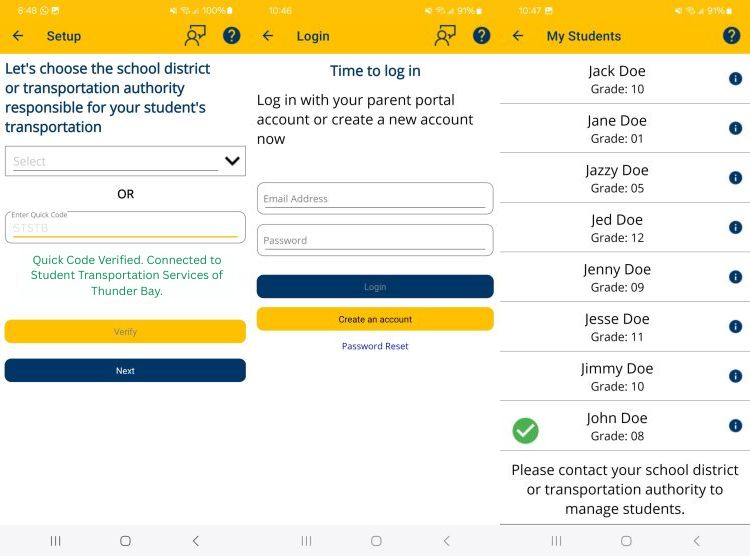
- Select Student Transportation Services of Thunder Bay from the dropdown menu or type STSTB under Quick Code and select 'Verify'
- Next > Log in using the same email address & password you used to create your parent portal account.
- Children attached to your Parent Portal account will be automatically assign to the Chipmunk App.
All STSTB school buses are equipped with GPS (Global Positioning System) trackers that locates the position of the bus. Chipmunk mobilizes this information in a simple but meaningful way – with both a map and ETA information – so that you can be prepared for the arrival of the bus.
MY STUDENTS
Automatically lists all students attached to your Parent Portal account. Selecting each student will provide School, Grade and Home Address information.
MAP
Select student from the drop-down menu and a map of home and school will appear. Once that student’s bus is moving you will see the path of the bus.
ETA
Provides expected time of arrival for each student.
ALERTS
Provides any ALERT information pertaining to your assigned buses such as delays and cancellations.
SETTINGS
- Ensure Radius and Alert Notifications are ON.
- You can edit your Notification Circle for each child to receive push notifications when the bus enters the radius.
- The Notification radius can be different for each child and for morning vs. afternoon bus.
Yes. You may use a single account to track all of your children – as long as they all ride a STSTB provided bus. Student's are automatically assigned to your Chipmunk account provided they have your Parent Portal email address in their student record with their schools.
Yes. Chipmunk provides a private and secure authentication process that allows only authorized contacts to access your child’s busing information.
Chipmunk is free for parents to download and use.
Yes. As soon as STSTB makes the change into their routing software, Chipmunk will automatically update to the new bus assignment and service details.
Yes.
All students have a school board issued email account, which they can use to create a Parent Portal account and access their busing information. Once the Parent Portal account is set up and their transportation details are visible, students can log into the Chipmunk app using the same credentials.
You can contact STSTB here for questions or account issues. They will be pleased to assist you with your Chipmunk account!
Download our general delay and cancellation notifications app:
BusPlanner Delays is an app designed to notify school, childcare, and other community stakeholders about bus delays and cancellations.
With the BusPlanner Delays App, you can receive school bus cancellation and delay notifications right on your mobile device, as soon as it is posted by the bus company on the Alerts page on our website. This gives you a quick and fully mobile-friendly way to receive updates related to only the school bus runs you choose to subscribe to.
Download and Set Up the BusPlanner Delays app:
-
Download the App
-
Download BusPlanner Delays from the Google Play or Apple App Store.
-
-
Select Your Transportation Authority
- Open the app and select “Select Transportation Authority.”
- Scroll to find and tap Student Transportation Services of Thunder Bay (STSTB) or type ststb
- Tap “Next.”
-
Select Your School(s)
- Tap “Select Schools.”
- Choose the school(s) you want to receive notifications for.
- To add multiple schools, continue selecting “Select Schools” and choose each one.
- To remove a school, tap the blue circle with the white minus sign beside the school name.
- When finished, tap “Next.”
-
Select Your Route/Run(s)
- Tap “Select Route/Run.”
- Choose the route(s) you want to receive notifications for.
- To add more routes, continue selecting “Select Route/Run.”
- To remove a route, tap the blue circle with the white minus sign beside the route name.
- When finished, tap “Done.”
- Note: AM and PM routes are listed separately. You must select both if you want notifications for morning and afternoon service.
-
View Notifications
- The Notifications screen will display any alerts related to your selections.
- When a delay or cancellation is posted on the STSTB website, you will receive a push notification, and details will be available in the app.
-
Make Changes to Your Selections
- Tap the wrench icon at the top of the screen.
- Follow the same steps above to update your school or route selections.
Each time a bus operator posts a delay or cancellation to the Alerts page on the STSTB website, that information is automatically sent to BusPlanner Delays app users who have selected that same run.
Users will receive a push notification on their device with basic information about the alert.
Tapping the notification—or opening the app—will display the full details of all current alerts for the runs they have selected.
No.
The BusPlanner Delays app is designed to provide general delay and cancellation notifications, the same as those posted on the STSTB website. These alerts are also sent as push notifications to your device.
The app does not provide:
- Live bus tracking
- Bus stop location details
- Estimated arrival times (ETAs)
How do I track my child’s bus?
Only authorized parent/guardian contacts with a Parent Portal account listing their students can access detailed transportation information.
Using the Chipmunk app, eligible users can:
- Track their child’s bus in real time during the run
- View stop location details
- Receive estimated arrival times (ETAs)
- Get delay and cancellation notifications specific to their child’s route
Because the Chipmunk app already includes delay and cancellation alerts, parents/guardians using Chipmunk do not need to use the BusPlanner Delays app unless they also want to receive delay and cancellation notifications for buses their children are not assigned to.
BusPlanner Delays is free to download and use.
You can contact STSTB here for questions or account issues. They will be pleased to assist you with the BusPlanner Delays app!